
JPG editing remains one of the most common image processing tasks in professional photography and digital marketing. Whether you're retouching product photos for an online store, optimizing images for social media, or preparing graphics for print materials, understanding how to edit JPG files without compromising quality is essential. The JPEG format's widespread compatibility and efficient compression make it the default choice for most digital images, but this convenience comes with specific challenges that every professional should master. This guide explores the technical aspects, best practices, and professional workflows for achieving exceptional results when working with JPG files.
Understanding JPG File Format and Compression
The JPG format uses lossy compression to reduce file sizes while maintaining acceptable visual quality.

This compression works by discarding data that the human eye struggles to detect, making JPG files significantly smaller than uncompressed formats.
How JPEG Compression Affects Your Edits
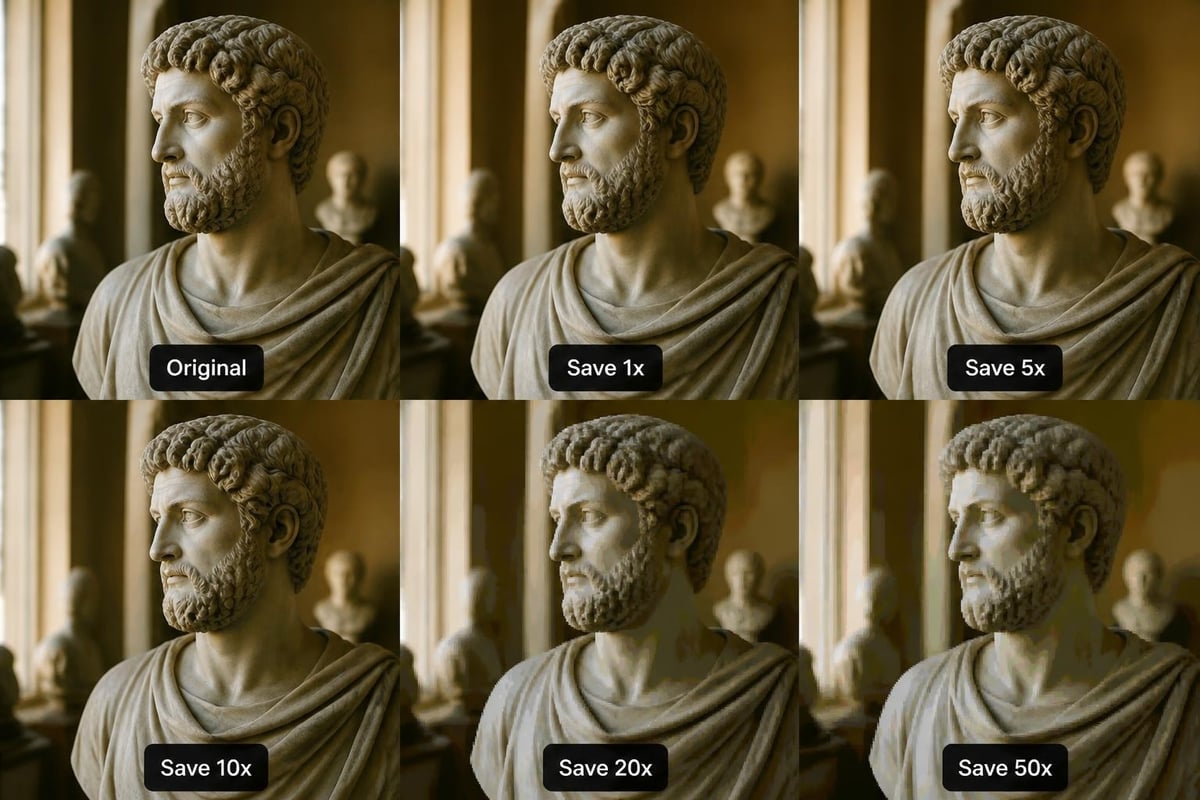
Every time you save a JPG file, the compression algorithm re-processes the image data. This repeated compression creates cumulative quality loss, introducing artifacts that become increasingly visible with each save cycle. Understanding this principle is fundamental to maintaining image integrity throughout your editing workflow.
Key compression considerations include:
• Quality degradation occurs with each save operation
• Compression artifacts appear as blocky patterns in areas of solid color
• Fine details and text become progressively less sharp
• Color banding may develop in gradients and smooth transitions
The compression level you choose directly impacts both file size and visual quality. Higher quality settings preserve more detail but create larger files, while lower settings sacrifice clarity for smaller file sizes. Imgfast’s comprehensive guide provides valuable insights into optimizing quality settings for different applications.
Optimal Quality Settings for Different Applications
Professional jpg editing requires selecting appropriate quality settings based on final usage. Web images typically tolerate compression levels between 60-80%, while print materials demand higher quality settings of 90-95% to prevent visible degradation.
| Application | Recommended Quality | File Size Priority | Detail Requirements |
|---|---|---|---|
| Web galleries | 70-80% | High | Medium |
| E-commerce products | 85-90% | Medium | High |
| Print materials | 95-100% | Low | Very High |
| Social media | 60-75% | Very High | Low to Medium |
| Email attachments | 65-75% | High | Medium |